

Shared files are enough when
- Your team shares one stable file link and it rarely changes.
- You update press materials once a year or less.
- Different people can share their own copy without version drift becoming a problem.
Executive summary
What it does, what it doesn't, and what to do next.
Use PressKit when your team is tired of tracking which press kit is current and who has the latest link.
What changes
Before
Your team updates the press kit and sends a new link. The old link still circulates. Someone sends a journalist last quarter's version. No one is certain which file is current without asking.
After
One EPK profile lives on the HubSpot Company record. Update it there, and the public URL reflects it. No new link to send. No version to track down.
Free evaluation tier available. Install and validate one Company profile before broader rollout.
Install free in HubSpot → Read docs →Quick spec
Concrete scope before deeper docs.
Fit check
Use this before you install.
Support hours: Monday-Friday, 9:00 AM to 5:00 PM America/Los_Angeles.
Response target: General support first response target: within 1 business day.
Visual proof
Start with the shipped interface, then use the flow diagram for operator context.
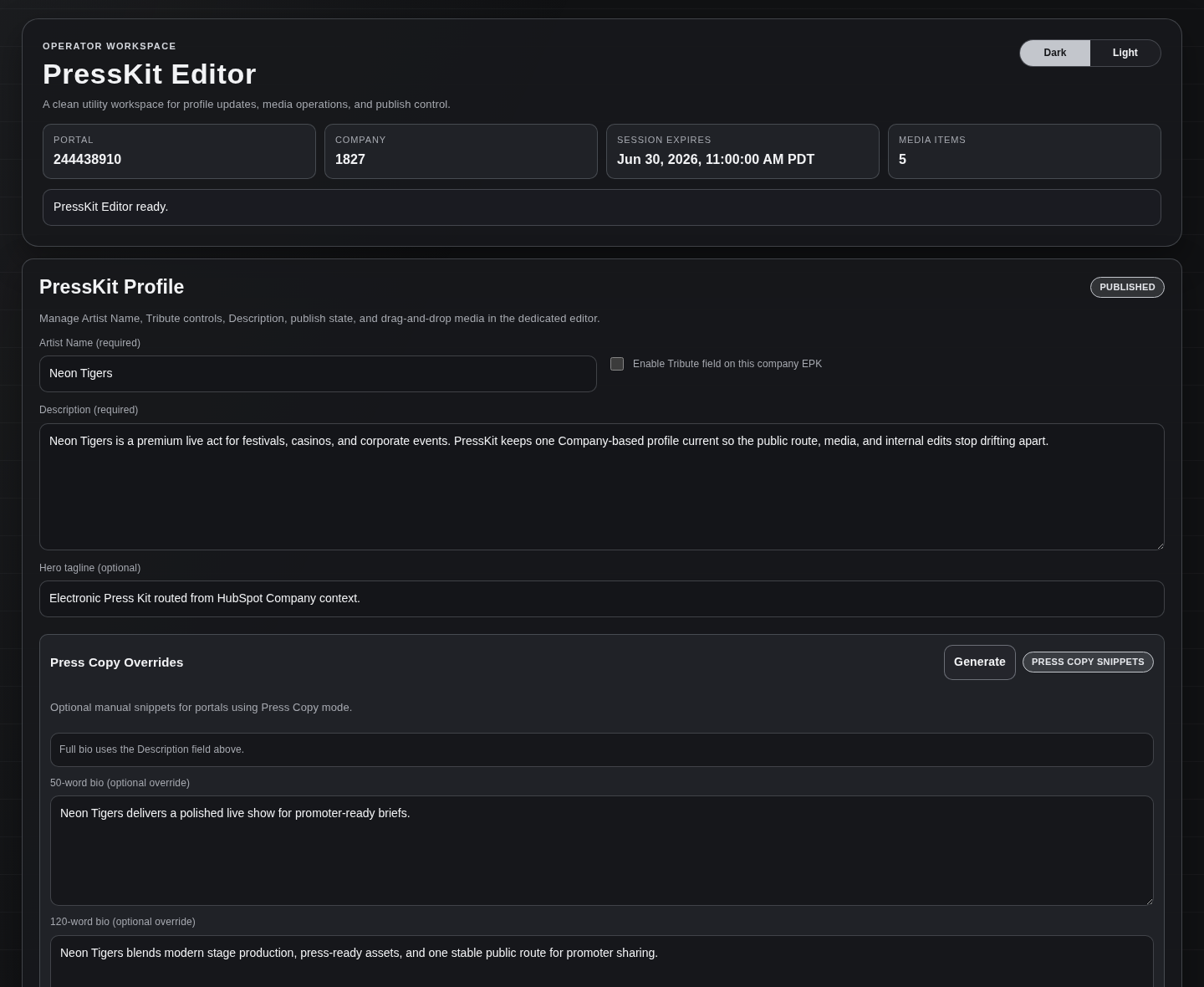
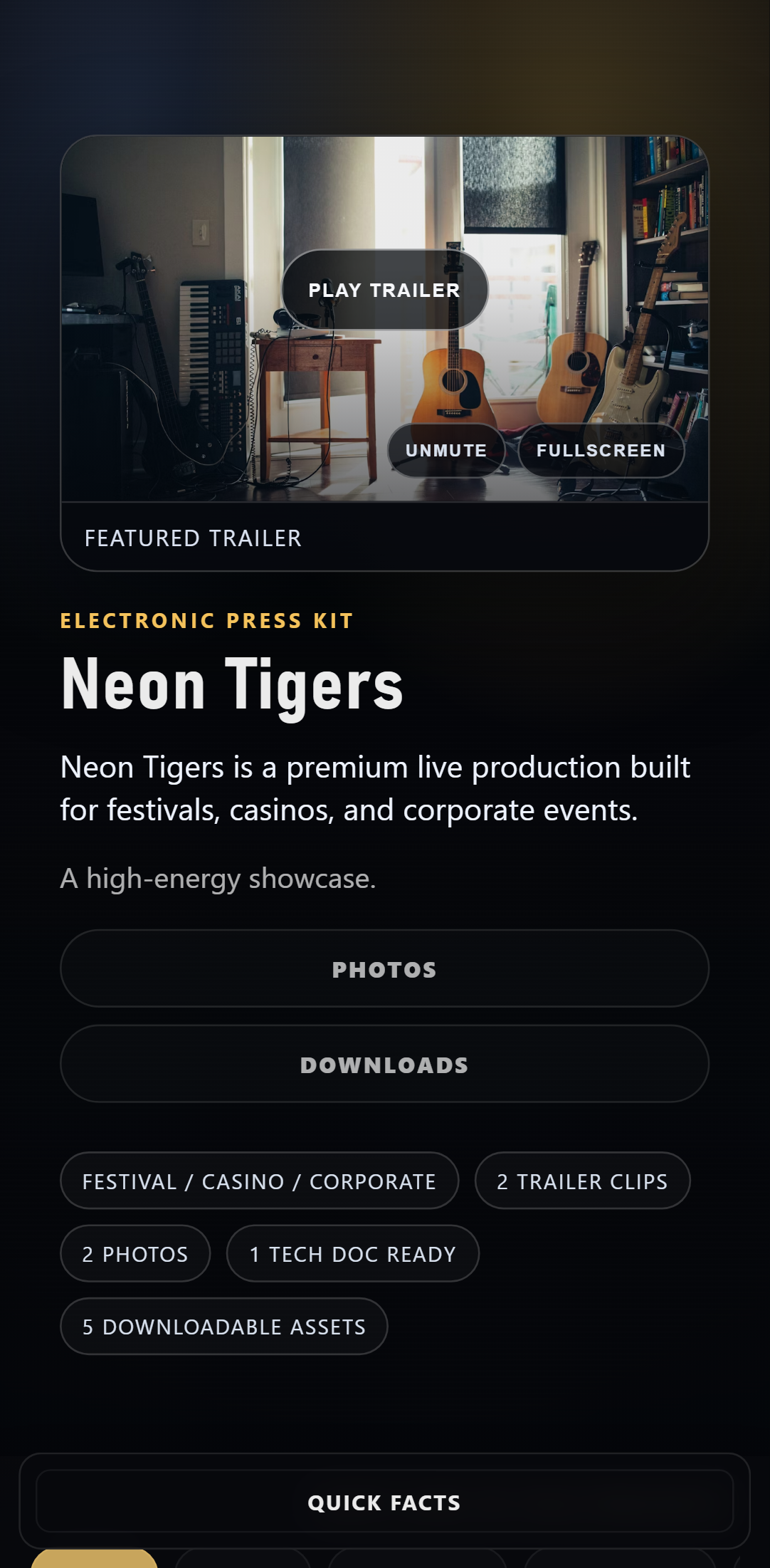

/epk/:portalId/:publicId. Review Portal Settings for default vs auto-publish posture.epk.autoPublishByDefault (one-way)./epk/:portalId/:publicId./epk/:publicId is deprecated and returns 404.Artist Name and Description must be present before publish state changes.Walkthrough video coming soon. In the meantime, install the free tier and try it in your own portal. Install free →
Shipped behavior
Claims below reflect currently documented behavior.
Uses a HubSpot Company record card to prepare and open the dedicated PressKit Editor (Prepare PressKit Editor Link → Open PressKit Editor).
Portal settings control visibility posture (including irreversible auto-publish), Quick Facts default-off behavior, public-page content defaults, hero behavior, video embed policy, and media limits. See Portal Settings.
Default mode (auto-publish OFF): Artist Name and Description are required to publish. Auto-publish changes the visibility default (including empty profiles).
Supports image uploads, document uploads, and HTTPS video links with media limits and MIME validation guardrails.
Public route contract is /epk/:portalId/:publicId. Default mode renders published records only; auto-publish mode makes pages accessible by default (including empty profiles).
Profile source of truth is HubSpot Company properties. Uploaded images/documents are stored via the HubSpot Files API.
Includes production safety controls like readiness checks (/ready), portal-scoped API boundaries, write-rate throttling, and explicit 4xx/5xx error boundaries.
Emits route + EPK workflow metrics for internal operational dashboards and release checks.
Operator flow
Use a narrow validation path before wider sharing.
Install + authorize
Install PressKit in HubSpot and complete OAuth authorization.
Choose your publish settings
Confirm default mode vs irreversible auto-publish in Portal Settings before wider access.
Open Company record and prepare editor
Open a HubSpot Company record and use the PressKit card to click Prepare PressKit Editor Link.
Open PressKit Editor and save
Click Open PressKit Editor, fill required fields (Artist Name, Description), add optional media (and Tribute to if used), then publish in default mode.
Stay current with docs
Use docs (including settings) to keep your configuration tied to documented behavior as the app updates.
Use cases
Examples reflect common press-kit publishing workflows in HubSpot.
Default mode (auto-publish OFF): create a Company-linked EPK draft, run required-field/media checks, then publish to a stable external route.
Keep one canonical EPK profile on the Company record so internal and external teams edit the same source data.
Default mode (auto-publish OFF): hold the profile in draft while legal/comms review content, then publish only after approval with route verification.
Update image/document assets and HTTPS video links in Company context with guardrails before each campaign wave.
Scope boundaries
Each out-of-scope item includes why it is constrained and what to do instead.
Manage one Company-based profile
One EPK profile per Company record keeps authoring and publish state deterministic.
Choose a public visibility posture
Default mode (auto-publish OFF): draft and missing records are not publicly accessible. Auto-publish mode (irreversible) makes public pages accessible by default, including empty profiles.
Use stable portal-scoped route
Public pages resolve at /epk/:portalId/:publicId, with legacy route deprecation enforced.
Enforce publish/media guardrails
Default-mode required fields plus media-limit/MIME checks keep public output predictable.
Share without accidental indexing
Public pages send X-Robots-Tag: noindex, nofollow and Cache-Control: no-store. PressKit is designed for sharing, not SEO.
Per-company theming/layout customization
Why: v1 prioritizes stable baseline rendering. Fallback: keep brand variation in source media/content assets.
Password-protected public links
Why: public route contract is intentionally simple in v1. Fallback: distribute links through your own access-controlled channels.
Built-in analytics UI
Why: current scope centers on authoring/publishing reliability. Fallback: measure distribution outcomes in your existing analytics stack.
Act as your public marketing site
Why: PressKit pages are intentionally noindex/no-store. Fallback: use your website for SEO and use PressKit links for direct sharing.
Docs and trust
Everything needed to evaluate and operate PressKit.
FAQ
Operational answers linked to scope and boundary docs.
Need help evaluating? Ask a rollout question →