DupliCat

DupliCat

Stop rebuilding the same record from scratch. Duplicate the HubSpot records your team repeats most often, with templates and defaults you configure once.

Executive summary

Read this before you install

What it does, what it doesn't, and what to read next.

Use DupliCat when you need repeatable record clones in HubSpot and you want the rules written down once.

  • DupliCat supports deals, contacts, companies, tickets, orders, projects, quotes, notes, tasks, calls, meetings, emails, and custom objects.
  • Uses templates, defaults, and workflow automation to keep clone results consistent. Associations, activities, and field rules carry over based on your template configuration.
  • Setup, permissions, limitations, and release history are all public before you install.

Best for

  • Teams cloning the same record types weekly with consistent field rules
  • Workflows that need automation to trigger clones, not just manual UI runs
  • Operators who need activity objects (notes, tasks, calls) cloned alongside records
  • Portal admins who want reproducible results across multiple team members

Not for

  • One-off record creation with no repeatability requirement
  • Copying read-only or system-managed fields (writable properties only)
  • Cloning attachments (out of scope in v1)

What changes

Your team runs this workflow every week. Here's what changes.

Before

Your team clones the same record types every week. Each run starts from scratch, someone cleans up the fields afterward, and the result depends on who did it. Associations get missed. The process isn't written down anywhere.

After

Configure a template once. Run it from the record card or a workflow trigger. Field verification starts from HubSpot property history, not memory. Every team member gets the same result.

Free evaluation tier available. Install and validate one controlled clone before broader rollout.

Install free in HubSpot → Read setup docs →

Quick spec

What DupliCat covers right now

Concrete scope before deeper docs.

  • Supported records include deals, contacts, companies, tickets, orders, projects, quotes, notes, tasks, calls, meetings, emails, and custom objects.
  • Use DupliCat in HubSpot record views, with preview support when configured.
  • Workflow cloning is available today for contact, company, deal, ticket, order, and project automation.
  • Rollout hint: validate one controlled clone before scaling.

Fit check

Native clone vs DupliCat

Use this before you install.

Native is enough when

  • You clone records occasionally and manual post-clone cleanup is manageable.
  • HubSpot's native clone covers your objects and you don't need templates, defaults, or workflow triggers.
  • One person handles all cloning and consistency between runs isn't a recurring problem.

DupliCat fits when

  • The same clone path repeats and you want the rules set once, not re-decided each run.
  • You need workflow automation to trigger clones, not just manual record-card runs.
  • Notes, tasks, calls, meetings, or emails need to clone alongside the parent record.
  • You want field verification after each run, traceable from HubSpot property history.
  • Multiple people run the same path and need consistent results, not operator-dependent outcomes.
All scopes documented. Each HubSpot permission DupliCat requests is listed with a reason before you install. Review scopes →

Visual proof

How DupliCat runs in practice

A flow diagram plus real card captures, mapped to shipped behavior.

Sanitized diagram showing DupliCat flow from HubSpot record card or workflow action through template rules and clone results.
Maps to shipped behavior: supported objects, template/default resolution, and the supported entry paths (cards and workflow action).
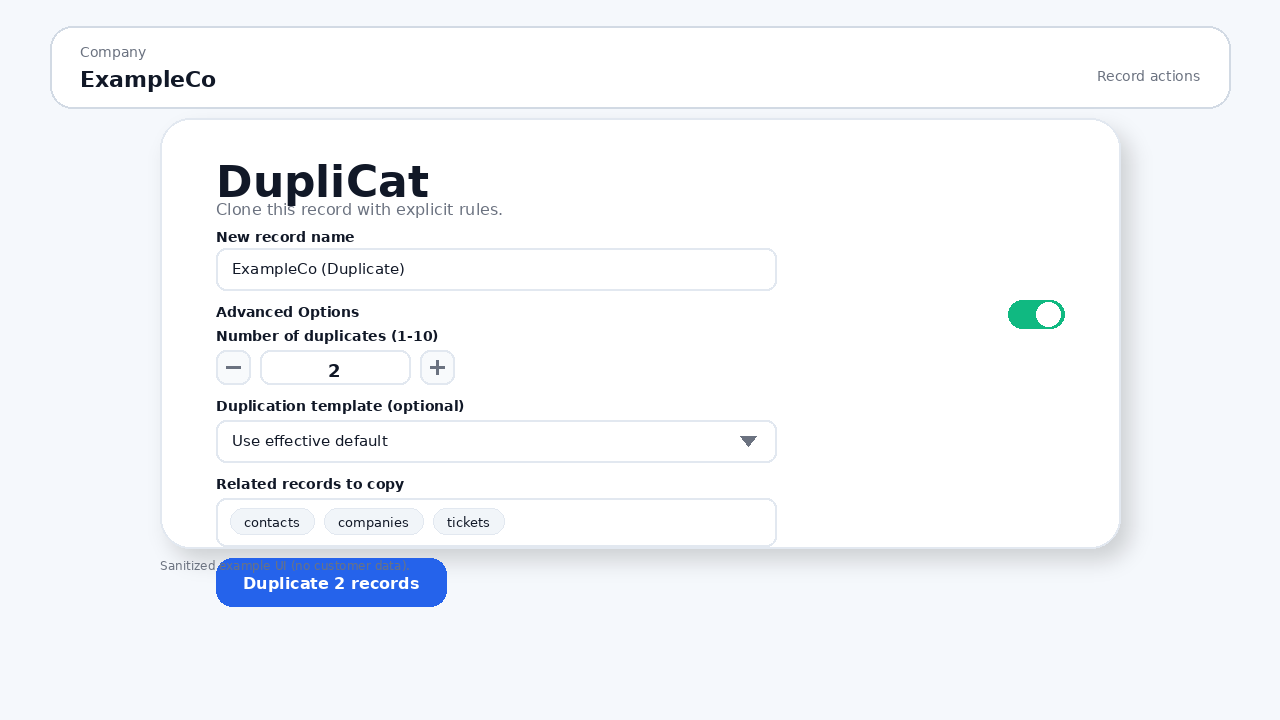
DupliCat record card before running a deal clone in HubSpot, showing duplicate count and template controls.
Record-card proof: clone controls visible before execution.
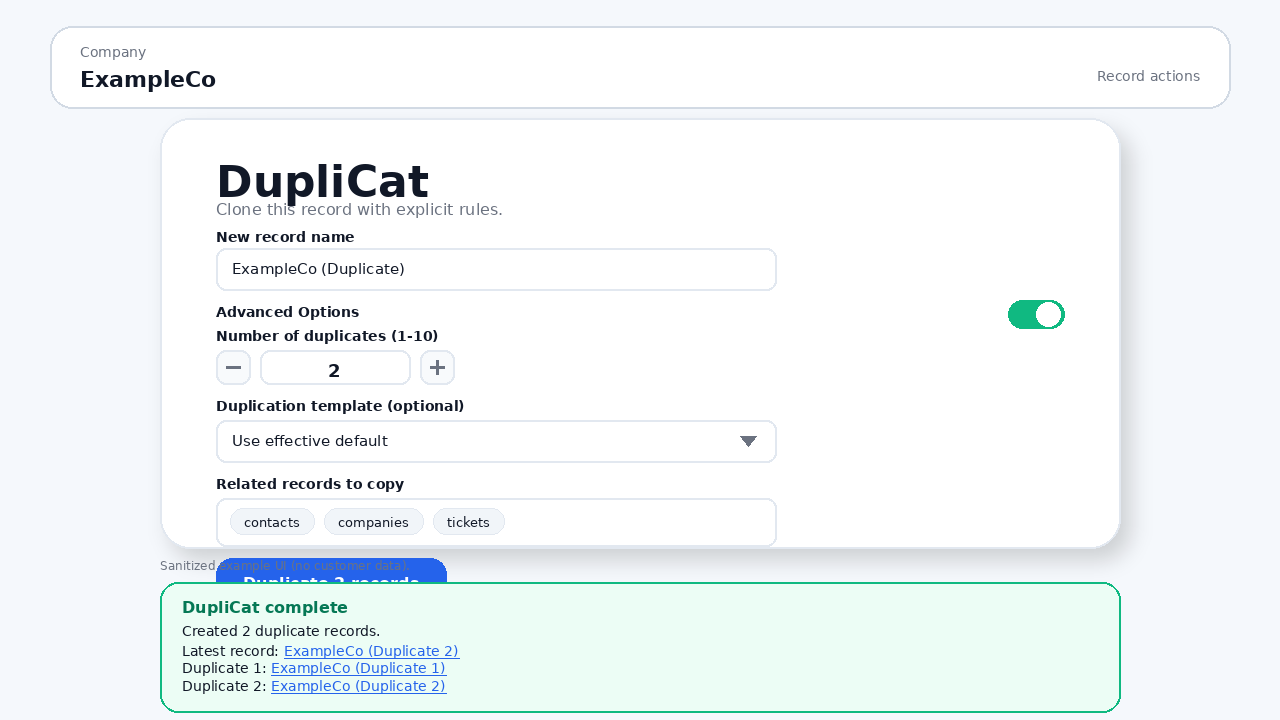
DupliCat record card after a clone run in HubSpot, showing success state and generated clone output links.
Record-card proof: post-run state with clone result outputs.

Walkthrough video coming soon. In the meantime, install the free tier and try it in your own portal. Install free →

Shipped behavior

Shipped behavior, stated plainly

Copy below sticks to shipped behavior and documented boundaries.

Supported records

Use DupliCat for repeatable cloning across deals, contacts, companies, tickets, orders, projects, quotes, notes, tasks, calls, meetings, emails, and custom objects.

Duplicate count control

Set `Number of duplicates` (`1-10`) per run. When count > 1, DupliCat applies numbered naming with a `[Duplicate]` name prefix so records are distinguishable.

Property handling

Copies writable properties. By default it copies populated (non-empty) values; you can enable empty-property copying when needed.

Association handling

Optionally re-links selected associations. For deals, line items can be deep-cloned (new line item records) instead of linked.

Activity-object cloning

Clone notes, tasks, calls, meetings, and emails when those records are part of the workflow you are standardizing.

Verification path

DupliCat does not provide a separate per-run customer-facing audit trail. CleverCat retains minimal operation records for support and operational review. Those records exclude property names and property values. For record-level verification, use HubSpot property history and the record activity timeline.

Operational controls

Settings and templates control naming, association copying, and deal line-item handling for repeatable operator runs.

Duplication templates

Save named templates per object type, set portal and personal defaults, and pick a template per clone run.

Enhanced overrides

Templates support date shift, owner rules, and pipeline/stage mapping (for deals and tickets) for advanced repeatable cloning behavior.

Traceable support

Start with HubSpot property history. If you need help, include portal ID, timestamp/timezone, and any visible warning/error text (plus workflow request ID if used).

Free tier available. Install and evaluate in your own HubSpot portal before committing to a paid plan. View pricing →

Operator flow

How teams roll it out without surprises

Use a narrow first-run path before wider adoption.

Install + authorize

Install in HubSpot, complete authorization, and confirm you can access settings.

Set defaults + templates

Configure portal defaults, then save templates for your first object type. Optionally set portal and personal defaults.

Configure entry paths

Add DupliCat to the record views your team uses and, if needed, configure the workflow action with template and override inputs.

Validate once

Run a small test clone, validate prefix naming behavior, duplicate count outcomes, template loading, and HubSpot Property history.

Scale deliberately

Review workflow docs, known limits, and release notes before expanding access to your full team.

Use cases

Workflow-shaped use cases

Examples map to repeatable operator tickets rather than generic feature bullets.

Quarterly renewals batch prep

Clone each renewal deal from a vetted template with line items and keep naming/rules consistent across the batch.

Region launch pack copy

Clone company/contact/ticket records for a new region while preserving the associations you intentionally copy.

Workflow-triggered duplicate creation

Run DupliCat from workflow automation when an approval stage is met, then review workflow history outputs before scaling.

Recurring campaign setup

Use enhanced overrides (date shift, owner rules, pipeline/stage mapping) so recurring setup stays repeatable.

Common problems

Search-style clone questions

Problem phrasing teams use before they evaluate setup details.

Scope boundaries

Does | Does not

Boundaries are part of the product: clear scope, clear fallbacks.

Does

  • Duplicate core CRM records

    DupliCat supports deals, contacts, companies, tickets, orders, projects, quotes, notes, tasks, calls, meetings, emails, and custom objects.

  • Run where your team already works

    Use DupliCat in HubSpot record views today, and use the workflow action when you want repeatable automation for contacts, companies, deals, tickets, orders, or projects.

  • Deep-clone deal line items

    When `line_items` is selected for deals, new line item records are created and re-associated to the clone.

  • Clone activity objects and related activities

    Notes, tasks, calls, meetings, and emails are supported when those records or related activities are part of the process you are standardizing.

  • Apply portal and personal defaults

    Templates and defaults exist at both scopes to keep team runs consistent while allowing user-level control.


Does not (and fallback path)

  • Copy read-only/system-managed fields

    Why: DupliCat copies writable properties only. Fallback: review critical fields after each run and handle system fields manually.

  • Deep-clone every associated record

    Why: associations are re-linked; deep duplication is scoped. Fallback: deep-clone deal line items when needed, and otherwise relink or recreate associations intentionally.

  • Clone attachments

    Why: attachments remain out of scope. Fallback: re-attach required files manually after clone.

  • Provide a separate audit trail

    Why: DupliCat does not provide a separate per-run customer-facing audit trail. Fallback: For record-level verification, use HubSpot property history and the record activity timeline.

Availability and pricing

Pricing and rollout path are explicit

Pricing is published, and setup has a controlled first-run path.

Pricing is public

Monthly and annual plan tiers plus overage policy are published on the pricing route.

Install path

Install in HubSpot, authorize OAuth, then validate one controlled first-run clone.

Procurement questions

Direct procurement, security, and support answers for rollout review.

Docs and trust

Decision-ready links

Everything needed to evaluate and operate DupliCat.

Pricing

Review plan tiers, monthly and annual billing, and overage policy.

Docs

Overview, first-run path, and capability summary.

Setup guide

Install, connect OAuth, configure defaults/templates, and run your first validated clone.

Workflow cloning guide

Set up and operate the workflow action, including configuration and run outcomes.

Enhanced overrides guide

Use date shift, owner rules, and pipeline/stage maps in reusable templates.

Changelog

Track release changes and rollout notes.

Known limitations

Review v1 boundaries before wider rollout.

Scopes and permissions

View the scope justification table and least-privilege principles.

Guides

HubSpot clone guides

Problem-first guides that route to setup, limits, and pricing.

Clone a HubSpot record

Native clone baseline vs template/default-driven cloning for repeatable runs.

Clone a HubSpot deal

Deal association handling plus line-item deep-clone behavior in current release.

Clone in workflows

Workflow-action clone path with renewal automation and explicit workflow history outputs.

FAQ

DupliCat FAQ for HubSpot operators

Operational answers linked to setup, scope, and boundary docs.

Does DupliCat support custom objects in HubSpot?
Yes. DupliCat supports deals, contacts, companies, tickets, orders, projects, quotes, notes, tasks, calls, meetings, emails, and custom objects. Review limitations for boundary details.
Why does DupliCat require its listed scopes?
Scopes are required for install authorization, reading source records, writing cloned records, and property metadata checks used to enforce writable and unique-field handling. See Scopes and Permissions.
What is the uninstall or data deletion path?
Uninstall removes app access from HubSpot. If you need stored CleverCat app data deleted for a portal, contact support with your portal ID.

Start small, then run it as operations

Install once, validate one controlled run, then use docs and pricing context for rollout decisions.

Need help evaluating? Ask a rollout question →